 By Zain
Introduction
The Dashlane Chrome extension is a powerful tool designed to make online security and password management simple.
It helps users save and autofill passwords, generate strong passwords, and manage personal information directly in Google Chrome. This extension is ideal for anyone looking to protect their online accounts and save time while browsing.
In this guide, you will learn about the Dashlane Chrome extension, its features, benefits, and how to set it up effectively.
What Is Dashlane Chrome Extension

The Dashlane Chrome extension is an add-on for the Google Chrome browser. It connects directly with your Dashlane account, allowing you to:
- Store passwords securely
- Autofill login information
- Generate strong passwords
- Manage personal data like credit cards and addresses
The extension works in real-time while you browse, making online activities faster and safer.
Key Features of Dashlane Chrome Extension
Password Autofill
The Dashlane Chrome extension automatically fills in login details for websites you visit. This saves time and reduces the risk of typing errors.
Password Generator
It can generate strong, unique passwords for each account, improving your online security.
Secure Storage
Your passwords and personal information are stored securely in Dashlane’s encrypted vault.
Security Alerts
Dashlane Chrome extension notifies you if your passwords are weak, reused, or compromised.
Easy Access to Accounts
You can quickly log in to websites without remembering multiple passwords.
Benefits of Using Dashlane Chrome Extension
Saves Time
No more manually typing usernames and passwords for every website.
Enhances Security
Strong, unique passwords reduce the risk of hacking.
User-Friendly
The extension is easy to use, even for beginners.
Sync Across Devices
Your Dashlane account syncs across all devices with the Chrome extension installed.
Autofill Payments
It can save credit card information for fast and secure online purchases.
How to Install Dashlane Chrome Extension
Step 1: Open Google Chrome
Launch the Google Chrome browser on your device.
Step 2: Visit Chrome Web Store
Go to the Chrome Web Store and search for “Dashlane Chrome extension.”
Step 3: Click Add to Chrome
Press the “Add to Chrome” button to start installation.
Step 4: Confirm Installation
Click “Add Extension” in the pop-up window.
Step 5: Log In to Dashlane
Once installed, open the extension and log in to your Dashlane account.
Step 6: Start Using Dashlane
The extension is now ready to save passwords, autofill logins, and generate strong passwords.
How to Use Dashlane Chrome Extension Effectively
Save Passwords Automatically
When you log in to a website, Dashlane Chrome extension will ask if you want to save the password. Click “Save” to add it to your vault.
Use Password Generator
Create strong passwords for new accounts by clicking the password generator feature.
Autofill Login Forms
When revisiting websites, Dashlane Chrome extension will automatically fill your login information.
Check Password Health
Regularly use the security dashboard to monitor weak or reused passwords.
Secure Payment Information
Add your credit card and personal info for faster checkout on online stores.
Common Mistakes to Avoid
- Using Dashlane on public computers without logging out
- Ignoring security alerts
- Reusing passwords even with Dashlane
- Not updating the extension regularly
Dashlane Chrome Extension for Teams and Businesses
Dashlane Chrome extension is also useful for teams. It allows organizations to:
- Share passwords securely between team members
- Assign different access levels
- Track password usage and security
- Reduce risk of breaches due to weak or shared passwords
Advantages Over Other Password Managers
The Dashlane Chrome extension stands out because:
- It is very user-friendly
- Offers autofill for payments
- Provides security alerts in real-time
- Works across multiple devices seamlessly
Frequently Asked Questions
Is Dashlane Chrome Extension free?
Dashlane offers a free version with basic features, while premium plans include advanced features like VPN and dark web monitoring.
Can I use Dashlane without the Chrome extension?
Yes, you can use the Dashlane app on mobile or desktop, but the extension makes web browsing faster and safer.
Is Dashlane secure?
Yes, Dashlane uses strong encryption to protect all saved data, including passwords and payment information.
Tips for Getting the Most Out of Dashlane Chrome Extension
- Always update the extension for latest features
- Use the password generator for all new accounts
- Regularly check the security dashboard
- Enable two-factor authentication for added security
Future of Dashlane Chrome Extension
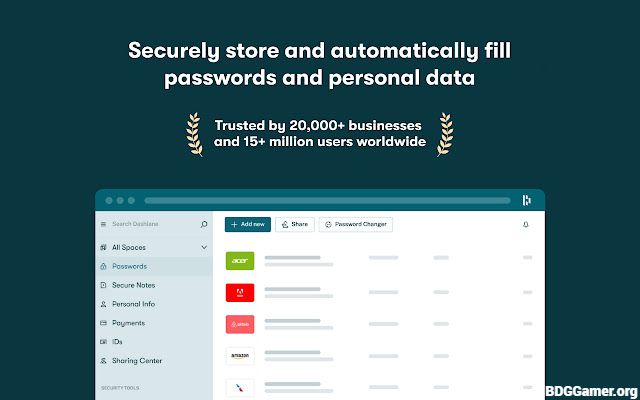
Dashlane continues to update its Chrome extension, adding features like:
- Enhanced autofill options
- Improved password health monitoring
- Integration with other apps and services
- AI-powered alerts for compromised accounts
Conclusion:
The Dashlane Chrome extension is an essential tool for anyone who wants to improve online security and simplify password management.
With its easy-to-use interface, password generator, secure vault, and autofill features, it makes browsing faster, safer, and more convenient. Whether for personal use or for teams, Dashlane Chrome extension is a reliable choice for modern online security.